
Free-Space Scrambler
Category: Utility - Windows 64
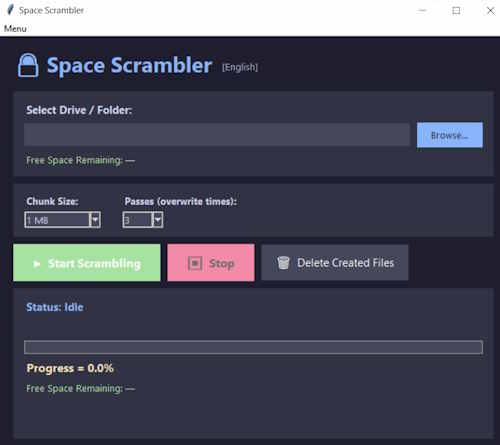
Space Scrambler 4.2 is a utility designed to overwrite free disk space with random data, making previously deleted files significantly harder to recover. The program works by creating temporary files (named TODELETE.TMP, TODELETE2.TMP, etc.) that fill available free space. These files can be safely deleted after the process completes. The software supports multiple overwrite passes and adjustable chunk sizes to improve coverage. A separate hash‑checking utility is included in the installation directory. If it is missing, download the official installer from: netogram.com/software
- The tool overwrites free space only. It does not modify existing allocated files.
- Repeated or prolonged use may increase wear on SSDs. Consult your SSD manufacturer’s guidance.
- Always maintain backups of important data. Misuse may lead to unintended data loss.
- Overwriting free space is irreversible.
The setup program installs all files into the folder 'SPACE SCRAMBLER' located
in: C:\Program Files
Inside this folder you will find:
- spacescrambler.exe : The main application.
- Spacescramblerhashcheck.exe : a companion tool that verifies the hash codes of spacescrambler.exe, the main application.
- space_scrambler_MANUAL.pdf : the full user manual in ENGLISH, FRANCAIS, DEUTSCH, ESPANOL & JAPANESE.
- unins000.exe the automatic uninstaller : you can run this file manually, but it is recommended to use the standard Windows 'Add or Remove Programs' option.
Setup EXE (20 MB):
MD5: af53de77cd725025731113a8d01f9bcc
SHA1: b8b8bc80663222de1cd5cff4a3df0d9b162e915b
SHA256: 36965d5d9db90836516e531b87662d3d0b962b81ff9fd829289d99604897a040
Setup ZIP (20 MB):
MD5: 0f93e8c662231ba57202e7a98e24bd63
SHA1: f55e26a56f876d7c9bb33e49cddb484d3da70498
SHA256: 372d90623ec44b476800283bb358de89d3a71df0e28198f17e119f83a123d273